Leads probably aren’t your real problem. Unpredictability is.
One month, referrals land. A webinar works. A few warm intros turn into calls. The next month goes quiet, and suddenly you’re back to chasing pipeline by hand. That feast or famine cycle is where most founders, consultants, and B2B sales teams get stuck on LinkedIn.
The fix isn’t “post more” or “send more DMs.” It’s building a system that attracts attention, identifies the right people, starts credible conversations, and scales without crossing into spammy behavior that can damage your account. If you want to know how to generate b2b leads on linkedin in a way that lasts, that’s the standard.
Why LinkedIn Is Your Untapped B2B Goldmine
LinkedIn is the one platform B2B teams can’t afford to treat as optional.
According to LinkedIn statistics for marketers in 2025, 80% of all B2B social media leads originate from LinkedIn, and the platform is 277% more effective for lead generation than other social networks. That’s not a small edge. It changes where your time should go.
Most companies spread effort across too many channels. They post on every network, test a little paid, run cold email, and hope activity turns into pipeline. That usually creates motion, not consistency.
LinkedIn works differently because buyers, operators, consultants, and decision makers already use it in a business context. You don’t have to force relevance. You have to show up with the right message, in front of the right people, often enough to become familiar.
Practical rule: Don’t treat LinkedIn as a content platform alone. Treat it as a full lead generation environment with four jobs: positioning, targeting, engagement, and outreach.
That also means you shouldn’t copy B2C social tactics. Going viral is optional. Building trust with a narrow set of qualified people is not.
If you want a broader list of proven ways to generate B2B LinkedIn leads, that resource is useful. The primary benefit comes from combining those tactics into one repeatable workflow instead of trying them one by one.
Foundation First Optimize Your Profile and Company Page
Before you message anyone, fix the assets they’ll inspect after seeing your name.
A weak profile kills momentum. You leave a smart comment, someone clicks, and what they find looks like a stale resume with no clear buyer relevance. That’s where a lot of lead generation dies.
Your profile needs to answer three questions fast
A prospect scanning your profile wants to know:
- Who do you help
- What problem do you solve
- Why should they trust you enough to reply
If any of those are fuzzy, outreach gets harder and inbound interest stays low.
Here’s a practical checklist.
| Element | Check | Key Action |
|---|---|---|
| Banner | Clear positioning | State audience and outcome in plain language |
| Headshot | Professional and current | Use a clean, credible photo with good lighting |
| Headline | Buyer focused | Replace job title only wording with value driven language |
| About | Problem to solution flow | Explain who you help, pain points, and what happens next |
| Featured | Proof and next step | Add a case relevant asset, offer, or booking link |
| Experience | Relevant credibility | Frame roles around outcomes and expertise, not duties |
| Company Page | Consistent brand story | Align offer, services, and recent posts with your positioning |
Bad versus good profile choices
The easiest way to improve a profile is to stop writing it for recruiters and start writing it for buyers.
Banner
Bad: Generic logo and abstract design.
Good: A short statement about your market and the result you help create.
Headline
Bad: “Founder at ABC Consulting”
Good: “Helping B2B SaaS teams turn LinkedIn conversations into qualified meetings”
About section
Bad: A life story, long credentials list, and vague language about passion.
Good: A short explanation of who you help, what usually goes wrong, your approach, and a simple invitation to connect.
Featured section
Bad: Empty.
Good: One useful asset, like a short guide, lead magnet, booking page, or a post that shows your thinking.
Your profile doesn’t need to impress everyone. It needs to make the right buyer think, “This person understands my world.”
Write for conversion, not self description
A lot of professionals over explain their background and under explain their relevance.
Prospects don’t need your full career path. They need enough context to trust your point of view. Keep the emphasis on the client’s problem. Mention your experience only where it supports that claim.
A simple structure works well:
- Who you help
- What problem they usually face
- How you approach it
- What kind of conversation to expect if they reach out
If you want inspiration, these LinkedIn profile examples are useful for seeing how positioning changes profile performance.
Don’t neglect the Company Page
Personal profiles often drive the first conversation, but company pages still matter.
People check them when they want to verify that you’re real, see how you describe your offer, and get a sense of whether the business is active. A neglected company page creates doubt even when your personal brand is strong.
Keep it simple:
- Use matching language across your profile, company page, and outreach.
- List services clearly so visitors don’t have to guess what you do.
- Post consistently enough that the page looks alive.
- Make employee profiles coherent if you have a team.
A short profile audit you can run today
Review your presence with this lens:
- Above the fold: Can someone understand your market and value in a few seconds?
- Trust signals: Do you show proof, insight, or relevant specificity?
- Next step: Is there an obvious path to connect, message, or learn more?
This work isn’t glamorous, but it compounds. Better comments, outreach, and content all perform better when the profile behind them is sharp.
Find Your Ideal Customers with Precision Targeting
Most LinkedIn prospecting fails before the first message.
The problem usually isn’t copy. It’s list quality. If you aim at a broad pool of “people who might buy,” you’ll waste time on weak fit accounts, wrong titles, and prospects with no urgency.
Start with an actual ICP
An ideal customer profile should be narrow enough that you can recognize a good prospect instantly.
For example, don’t target “marketing leaders.” Target something like this:
- Industry: SaaS
- Company size: 50 to 200 employees
- Region: United States
- Function: Marketing
- Seniority: Director or Head level
- Situation: Team is growing, pipeline pressure is visible, and LinkedIn activity suggests active demand generation
That level of detail changes everything. It improves your search, your messaging, your content angle, and your follow up timing.
Use LinkedIn search in layers
Free LinkedIn search can work if you’re disciplined.
Start broad, then tighten. Search for the account type first, then the people inside those accounts, then the signals that suggest relevance.
A practical workflow looks like this:
- Build a company list based on headcount, geography, and industry.
- Search for people within those companies using job titles and seniority.
- Review profiles manually to confirm fit.
- Save or tag the strongest prospects based on role fit and visible activity.
According to this guide to LinkedIn B2B lead generation, effective targeting on LinkedIn uses a tiered workflow: create target account lists with filters like headcount and location, then run lead searches by specific job title and seniority to isolate decision makers.
Here’s a walkthrough that complements that process:
Boolean search makes targeting less sloppy
Boolean search sounds technical, but the practical benefit is simple. It helps you stop pulling in irrelevant people.
For the SaaS example above, your search logic might look like this in spirit:
- Include titles such as “Marketing Director” OR “Head of Marketing”
- Exclude roles like “agency owner” or “student”
- Limit to the right geography
- Cross check company size and industry before saving the lead
The point isn’t fancy syntax. The point is reducing waste.
If you want a clearer breakdown of filters, operators, and how LinkedIn search behavior works in practice, this guide on how LinkedIn search works and how to hack it is worth reviewing.
What to look for after the search
A title match alone isn’t enough.
Once you have a list, inspect these signals qualitatively:
- Profile activity: Are they posting, commenting, or engaging?
- Role relevance: Can they influence or approve the kind of purchase you sell?
- Business context: Is the company in a stage where your offer matters?
- Timing clues: Job changes, hiring, product launches, and company updates often increase receptivity.
That last point is often underestimated. Messaging a good fit buyer at the wrong time is still weak prospecting.
The best LinkedIn lists don’t just match your ICP. They match your ICP at a moment when the problem is active.
A simple targeting mistake to avoid
A lot of teams use Sales Navigator or LinkedIn search as list building tools only. That’s too shallow.
The primary goal is not “find names.” It’s “find people with role fit and reason to care now.” If your list doesn’t include some evidence of context, you’re not targeting. You’re just filtering.
That’s why I prefer smaller, cleaner lists over giant exports. They’re easier to personalize, easier to engage before outreach, and far more useful once replies start coming in.
Create Content and Engage Like a Magnet
It is often assumed that LinkedIn lead generation starts with posting every day. It doesn’t.
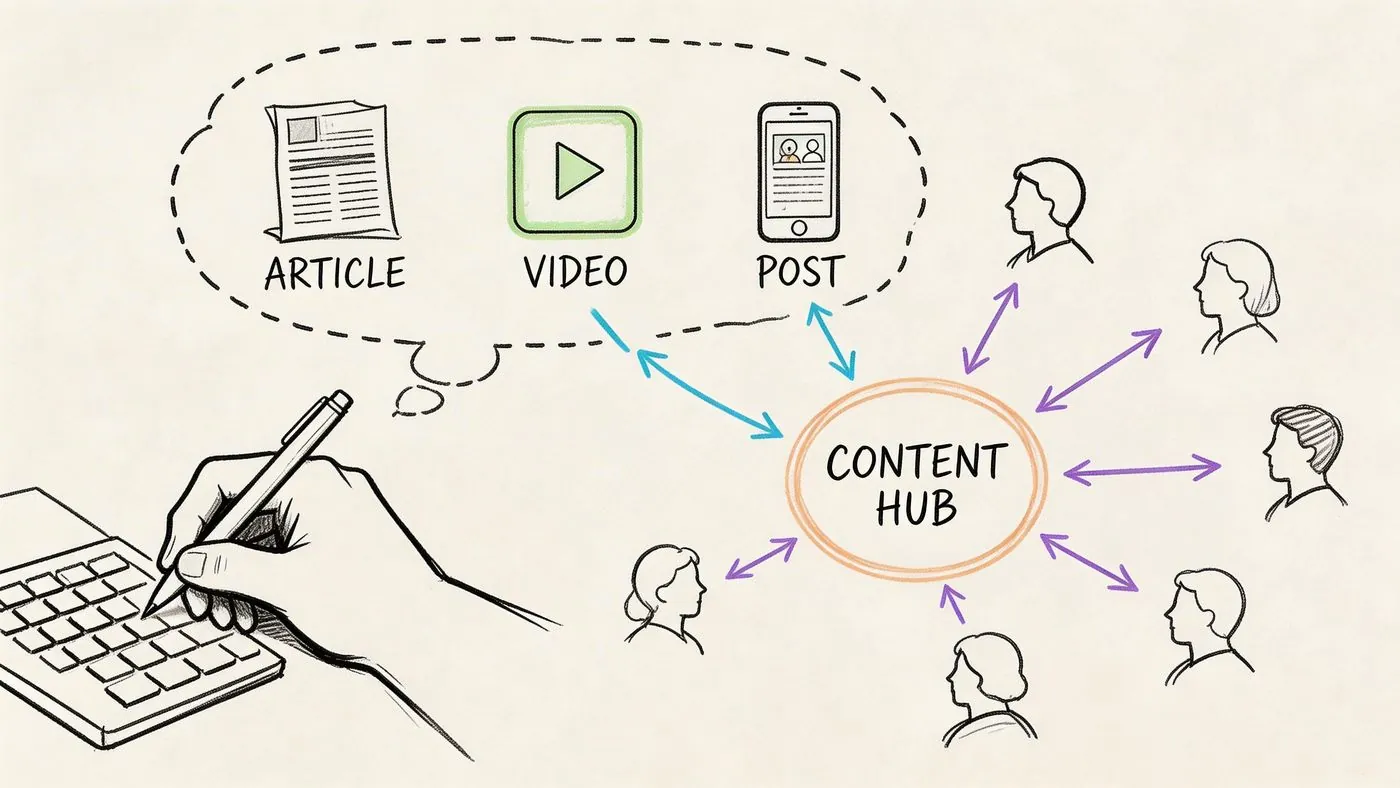
If your network is still small or your profile isn’t yet a destination, posting alone can feel like talking into an empty room. Strategic engagement is often faster. Good content still matters, but comments on the right posts can put your name in front of buyers sooner than publishing another generic carousel.
Content that builds trust without draining you
You don’t need a thought leadership identity crisis. You need a publishing rhythm you can sustain.
Three content types work well for most B2B operators:
Document what you’re seeing
Share patterns from sales calls, delivery work, objections, and market changes.
This works because it sounds earned. Buyers can tell the difference between recycled advice and something drawn from actual client conversations.
Respond to industry noise
Take a trend, tool, or common claim and add your view.
Short commentary often outperforms polished “big” posts because it’s easier to consume and feels more timely. If everyone in your market is chasing one tactic, explain where it works and where it breaks.
Teach one useful thing
Keep it narrow. One mistake. One workflow. One before and after example.
That style is easier to produce consistently, and it attracts the right audience better than broad motivational content.
Engagement is the underrated growth channel
Commenting on the right posts does two jobs at once. It gives you visibility with the post author and with the people reading the thread.
Many B2B founders get their first meaningful LinkedIn traction this way. Not from their own feed. From showing up intelligently in someone else’s.
A strong comment usually does one of these:
- Adds a missing angle
- Disagrees respectfully with reasoning
- Translates a broad idea into a practical example
- Builds on the post with an operator’s perspective
Weak comments do none of that. “Great post” is invisible. “Totally agree” adds nothing. AI sludge that sounds polished but generic is even worse.
“If your comment could fit under any post, it won’t generate leads under this one.”
Where automation goes wrong
This is the part most guides skip.
A lot of LinkedIn automation tools are designed around volume. More visits, more messages, more reactions, more activity. That approach can create short bursts of reach, but it also creates risk.
According to this analysis of LinkedIn lead generation strategies, manual hybrid automation yields 3x higher long term lead quality than full automation, LinkedIn restricted 18M fake accounts in Q1 2026, and some B2B users reported 25% suspension rates for over engagement. The lesson is straightforward. Full autopilot behavior attracts the wrong kind of attention.
What safe scaling actually looks like
Compliant scaling is selective, not aggressive.
Use automation only where it supports real relevance and keeps a human in the loop. In practice, that means:
- Targeting narrow creator sets where your buyers already pay attention
- Using keyword or topic filters to avoid random engagement
- Reviewing tone and context so comments sound like an informed human
- Spacing activity naturally instead of hammering the platform
- Approving sensitive interactions manually when needed
One option in this category is PowerIn, which automates contextual commenting on LinkedIn based on keywords and selected creators, with controls like manual approval, timezone targeting, and multilingual support. That’s very different from tools built around blasting actions at scale.
A simple weekly rhythm
If you want traction without turning LinkedIn into a full time job, use a balanced cadence:
- Publish a few useful posts each week
- Comment on posts from prospects, partners, and relevant creators
- Revisit people who engage with your comments or profile
- Turn repeated questions into future content
That loop works because engagement feeds visibility, visibility feeds profile visits, and profile visits make outreach warmer.
Content attracts. Comments accelerate. Together, they make your name familiar before you ever send a message.
The Art of the Outreach Sequence
Outreach works best when it feels like the next logical interaction, not the first time someone has ever noticed you.
That’s why generic templates underperform. They ignore context, flatten the recipient into a job title, and make every message sound interchangeable.
Personalization matters, but not the creepy kind
The right level of personalization is light, relevant, and business specific.
According to the Belkins LinkedIn outreach study, connection requests with a message get a 9.36% reply rate versus 5.44% without one. That gap is big enough to matter, especially if LinkedIn is a core outbound channel for you.
What doesn’t work is fake familiarity.
Avoid messages that mention personal trivia, old education details, or random profile facts just to prove you looked. That reads as awkward, not thoughtful.
A practical sequence that doesn’t feel spammy
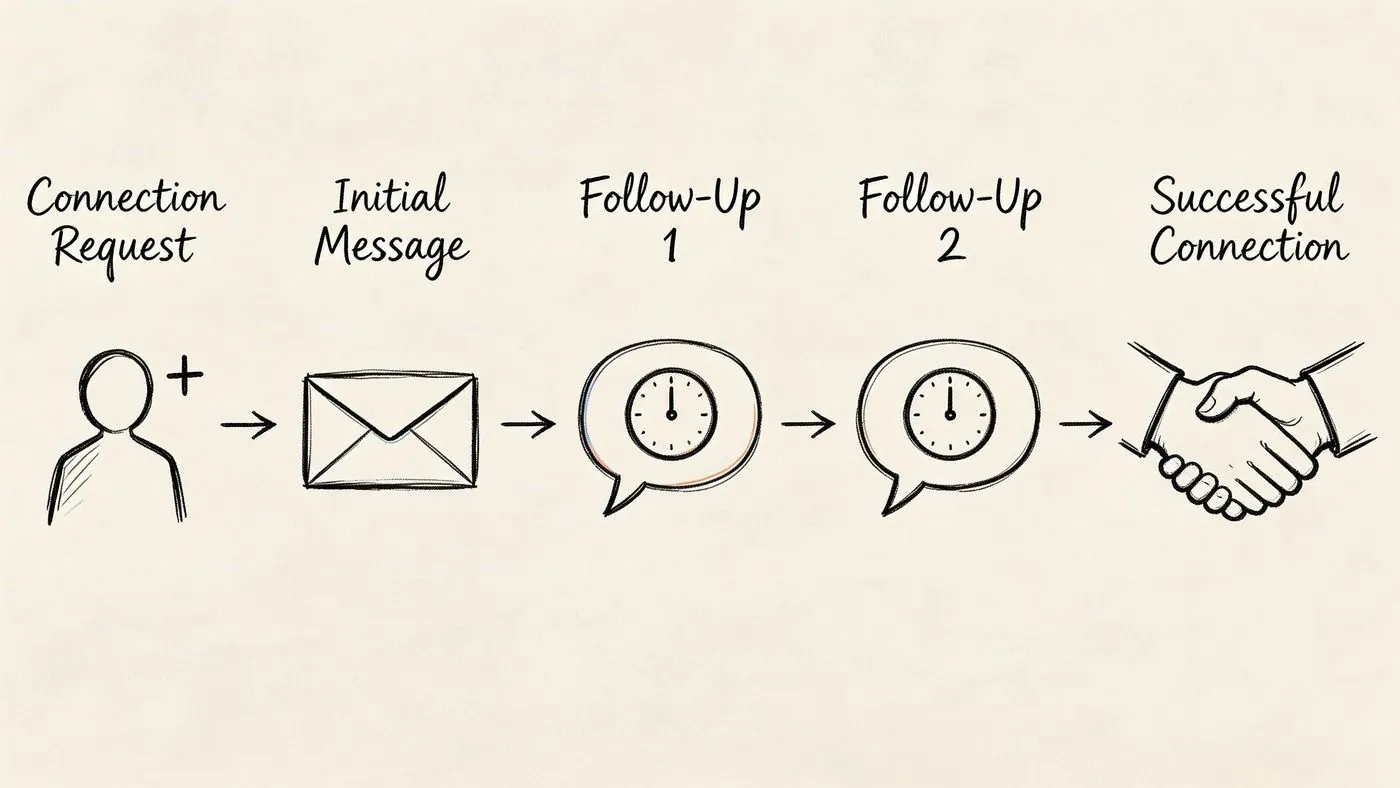
A simple multi touch flow is enough for most B2B teams.
Step one
Send a connection request with a short note tied to something real.
Example:
Hi Sarah, saw your recent post on pipeline quality versus lead volume. Strong point. I work with B2B teams dealing with the same issue and thought it made sense to connect.
That note is short, specific, and low pressure.
Step two
After they accept, don’t rush into the pitch if there’s no reason to.
A clean first message can look like this:
Thanks for connecting. I liked your point about lead volume hiding weak qualification. A lot of teams don’t spot that until much later. Curious how you’re thinking about LinkedIn in the mix this year.
This opens a conversation. It doesn’t force a meeting request before trust exists.
Step three
If there’s no reply, follow up with value, not friction.
Example:
Quick follow up. I put together a short framework on improving LinkedIn conversations without relying on mass outreach. Happy to send it if useful.
That works better than “just bumping this” because it gives them a reason to engage.
Outreach messages that usually fail
Some patterns keep showing up in underperforming sequences:
- The instant pitch: “Thanks for connecting, here’s what we do.”
- The giant paragraph: Too much context, too little clarity.
- The fake compliment: Empty praise followed by a hard turn into a sales ask.
- The over personalized opener: Business outreach shouldn’t sound like surveillance.
Keep the ask small
A LinkedIn message should earn the next step, not force the whole sales process into one interaction.
Good asks are simple:
- Open to exchanging notes?
- Want me to send the resource?
- Worth a short conversation if this is a priority?
Bad asks jump too far:
- Can we book 30 minutes next week?
- Are you available for a demo?
- Want to discuss how we can transform your revenue engine?
Sequence length and tone
You don’t need an elaborate playbook with endless touches.
A short sequence with real relevance outperforms a long automated chain. If someone doesn’t respond after a reasonable follow up, move on and stay visible through content and engagement. LinkedIn is not only an inbox channel. It’s a familiarity channel.
Keep outreach short enough to read on a phone and specific enough that it couldn’t have been sent to everyone else.
That’s the standard. Relevance over cleverness. Conversation over pitch.
Scale Smartly with Safe Automation and Measurement
If your LinkedIn process depends on perfect manual discipline, it won’t last.
People get busy. Content slips. Follow ups get missed. Comments stop. That’s why sustainable lead generation needs a system you can maintain when the week gets messy.
Scale the right activities
Not every task should be automated.
The safe place to gain efficiency is the repetitive layer around targeting, visibility, and follow up support. The risky place is full autopilot behavior that imitates a person too aggressively.
A good setup usually includes:
- Structured prospect lists
- Consistent engagement on relevant posts
- Light outreach sequences with room for manual judgment
- A simple review process for replies and handoffs
If you want to tighten that system, this article on automated LinkedIn outreach is a practical reference for where automation helps and where it creates problems.
Measure behavior that leads to meetings
A lot of teams track vanity metrics and skip the numbers that reveal whether the system is healthy.
The indicators that matter most are straightforward:
Top of funnel visibility
Track profile views, relevant post engagement, and whether your comments are attracting the right people.
Middle of funnel traction
Watch connection acceptance, reply quality, and how many conversations continue beyond the first response.
Bottom of funnel outcomes
Measure qualified meetings booked, not just “leads” created. A noisy inbox is not pipeline.
Use on platform capture when you run paid campaigns
If you’re using LinkedIn ads, don’t send every click to a traditional landing page by default.
According to Firebrand’s LinkedIn B2B lead generation best practices, LinkedIn Lead Generation Forms convert at approximately 13% compared with 4.02% for traditional landing pages, a 223% performance improvement. That’s a strong case for using native forms when speed and reduced friction matter more than sending traffic off platform.
The implementation details matter too. Keep required fields tight, and make sure sales can act on what gets captured.
Know when to delegate
A healthy LinkedIn system creates more conversations than one founder or rep may want to handle alone.
At that point, the constraint shifts from lead generation to follow up capacity. Some teams solve that by hiring internally. Others delegate remote appointment setting so someone can keep sequences organized, qualify replies, and protect calendar time.
That handoff only works if your messaging, ICP, and qualification standards are already clear. Delegation doesn’t fix a messy process. It amplifies whatever process you have.
The real scaling mindset
The goal isn’t maximum activity. It’s repeatable, credible activity.
A smaller number of well targeted interactions, tracked properly and supported by safe automation, will outperform frantic outreach bursts every time. That’s how LinkedIn becomes a channel you can trust instead of a channel you keep restarting.
Frequently Asked Questions
How much time does LinkedIn lead generation take each week
Less time is needed than generally believed, if the system is focused.
A practical setup usually means maintaining your profile, publishing useful content on a steady rhythm, engaging in relevant conversations, and running a light outreach process. The time goes down when your ICP is clear and your workflow is consistent. The time goes up when you’re improvising every message and chasing the wrong people.
Is Sales Navigator worth paying for
Usually, yes, if LinkedIn is a serious channel for your business.
The value isn’t just the filters. It’s the ability to build cleaner account lists, isolate the right decision makers, and monitor activity more intentionally. If your current prospecting is broad and manual, Sales Navigator can tighten targeting fast. If you still don’t know your ICP, buying it won’t solve that.
Should I post every day to generate leads
No.
Consistency matters more than frequency. Most B2B teams get more from a sustainable mix of posting and strategic commenting than from trying to publish daily. If daily posting lowers quality or burns you out, it’s the wrong plan.
What’s the biggest mistake people make on LinkedIn
They try to scale before they’ve earned trust.
That shows up as generic outreach, weak profiles, unfocused targeting, and aggressive automation. LinkedIn rewards relevance. People reply when your presence feels credible and your message connects to something they already care about.
Should I automate LinkedIn activity at all
Yes, but carefully.
Automation is useful when it supports relevance and keeps your activity consistent. It becomes dangerous when it replaces judgment, sends generic messages, or drives unnatural engagement patterns. Manual hybrid systems are safer and usually better for lead quality.
How do I know if my LinkedIn strategy is working
Look at the chain, not one metric.
You want to see the right people viewing your profile, accepting connection requests, replying to messages, and eventually taking qualified meetings. If visibility is rising but conversations aren’t, your positioning or outreach needs work. If outreach gets replies but no qualified calls, your targeting may be off.
If you want a safer way to stay visible on LinkedIn without turning to spammy automation, PowerIn helps automate contextual comments on relevant posts while keeping targeting and control in your hands. It fits best for founders, SDRs, and small teams who want a consistent engagement layer to support outreach, content, and inbound interest.