Knowing how to get my linkedin url is easy, but most people stop there. The real magic happens when you customize it. An auto generated LinkedIn URL is long, forgettable, and looks unprofessional: it’s like showing up to a meeting with a coffee stained shirt. A clean, custom URL, on the other hand, is sharp, memorable, and a killer branding tool.
Why Your LinkedIn URL Is Your Most Underrated Asset
Your LinkedIn link is far more than a simple web address. It's a piece of your professional identity. When you first sign up, LinkedIn hands you a default URL cluttered with random characters. It’s not just ugly; it’s a massive missed opportunity.
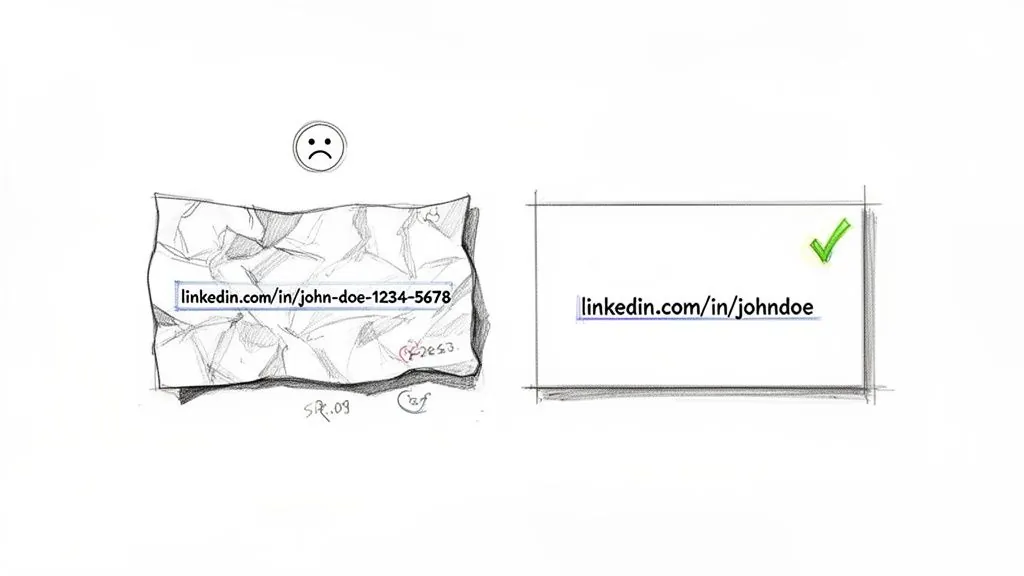
Just ask yourself: which of these links looks more credible?
linkedin.com/in/jane-doe-a4b81z75linkedin.com/in/janedoe-marketing
The second one wins, hands down. It's clean, instantly communicates her specialty, and is easy to recall. For B2B founders, salespeople, and consultants, this small change can turn a passive profile into a powerful tool for generating leads.
From Passive Link to Active Lead Magnet
A custom URL creates a direct path back to your profile, making it incredibly simple for potential clients and partners to find you. When you drop it in your email signature, on business cards, or in your social media bios, you’re building a seamless bridge to your professional world.
This is especially true if you’re actively engaging on the platform. Since its launch in 2003, LinkedIn has grown into a powerhouse, projected to hit over 1.3 billion total members by 2026. A simple URL like linkedin.com/in/yourname helps you stand out in that massive crowd. That’s crucial, considering LinkedIn drives 75 to 85% of all B2B leads from social media and has a conversion rate 3 to 4 times higher than its peers.
A clean URL isn't just about looking good. It signals professionalism and attention to detail. These small cues build trust and credibility before someone even reads your headline or work history.
The Shareability Factor
Beyond looking professional, a custom URL is just plain easier to share. You can say it out loud, type it from memory, and add it to posts without creating an eyesore. This principle of having a clean, public facing link isn't just a LinkedIn thing. For a deeper dive into how these URLs work across different platforms, check out this ultimate guide to your social network URL.
Think about it: a memorable URL gets more clicks. It's that simple. When you're commenting and adding value, a clean link in your bio makes it effortless for interested people to check you out. It’s one of the fastest and easiest wins you can score on the platform, setting the stage for more meaningful connections and real business opportunities.
Finding and Customizing Your LinkedIn URL in Under Two Minutes
So, you’re ready to ditch that clunky, auto generated LinkedIn URL? Smart move. Thankfully, this is one of the easiest and fastest ways to polish your professional brand. The whole process takes less than two minutes, whether you’re on a computer or your phone.
Let's walk through exactly where to click. This isn't just a technical tweak; it's about claiming a clean, professional web address that you can confidently share on resumes, in email signatures, and on business cards.
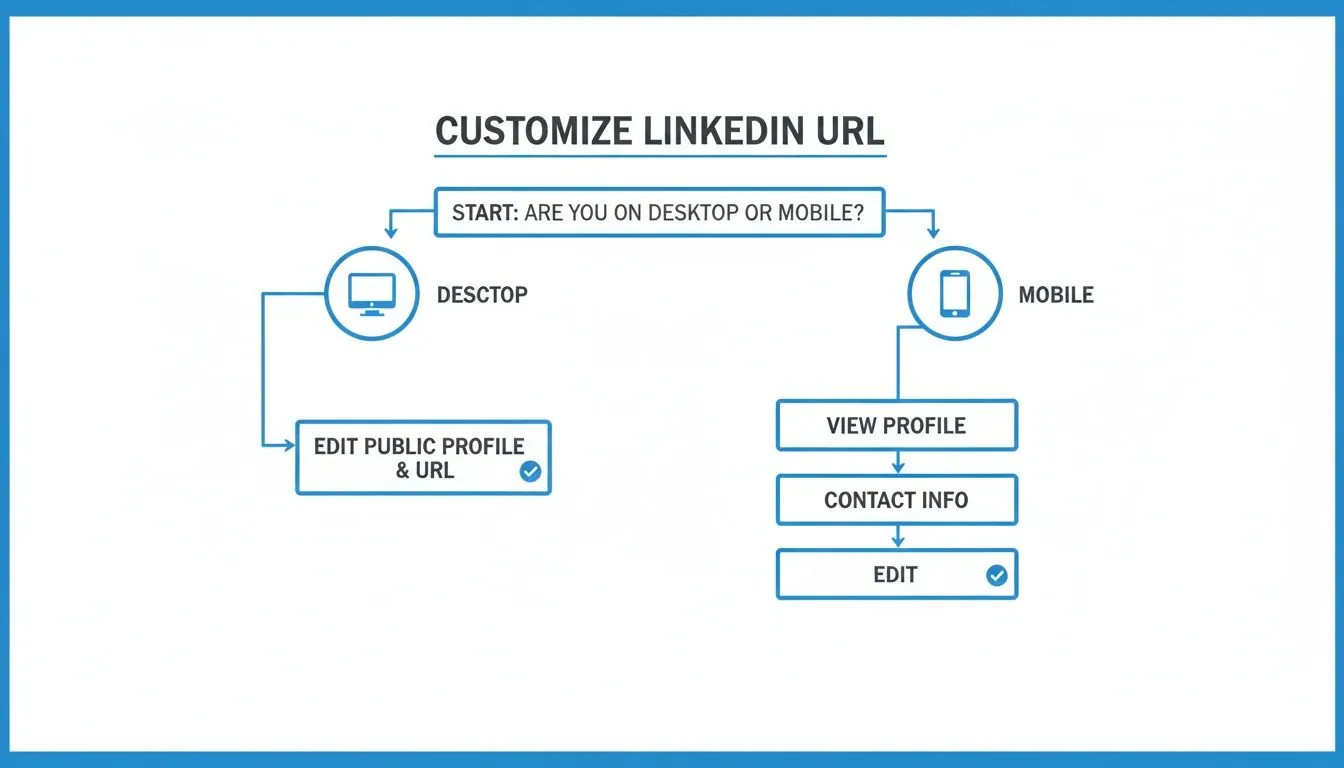
How to Find and Edit Your URL on Desktop
Using a desktop computer is probably the quickest way to get this done, since the layout is a bit more spread out.
First, log into LinkedIn and head to your own profile page. You can get there by clicking the "Me" icon in the main navigation bar and then selecting "View Profile."
Once you're on your profile, look to the upper right corner of the page. You'll spot a link that says "Edit public profile & URL." Go ahead and click that.
LinkedIn will open a new tab. On this new page, look to the right hand side again for the "Edit your custom URL" section. Click the little pencil icon next to your current URL, and you're ready to type in your new one.
This is your moment to create a simple, memorable handle.
The Ground Rules for Your Custom URL
Before you start brainstorming, you need to know LinkedIn’s rules. Following them will make sure your new URL gets approved on the first try.
- Length: Your URL has to be between 3 and 100 characters. Shorter is almost always better and easier for people to remember.
- Characters: Only letters and numbers are allowed. You can't use spaces or special symbols, but hyphens are fair game. A hyphen is great for separating your first and last name (like
jane-doe). - Uniqueness: This is the big one. Your URL has to be one of a kind. If
linkedin.com/in/johnsmithis already taken, you’ll have to add a middle initial or another identifier to stand out.
Think of your URL like a brand name. It should be professional, easy to say, and hard to misspell. Your full name, or a simple variation of it, is the gold standard here.
Updating Your URL from the Mobile App
If you're away from your desk, you can easily update your URL right from the LinkedIn mobile app. The steps are a little different but just as quick.
Open the app and tap your profile picture in the top left corner, then tap "View Profile." On your main profile screen, tap the pencil icon to go into edit mode. Now, scroll all the way to the bottom until you see the "Contact info" section and tap the "Edit" link next to it.
Right at the top of the next screen, you'll see your "Profile URL." Tap it, and you can customize your link right there.
Once you have your clean, professional link, you can start using it to build your brand everywhere. But having a polished URL is just one piece of the puzzle. A seriously powerful skill is learning to find other people's profiles for networking and outreach, a technique you can master by learning how to find a LinkedIn profile on Google. This strategy perfectly complements your own sharp, professional presence.
After you’ve saved your new custom URL, you've officially upgraded your digital business card.
Best Practices for Crafting a Memorable URL
Now that you know how to change your LinkedIn URL, the bigger question is what you should change it to. This isn't just about cleaning up a messy link; it's a small but powerful piece of your personal brand.
Think of your URL as a digital handshake. It should be simple, professional, and unmistakably you. Your goal is to make it incredibly easy for someone to find your profile and, just as importantly, remember how to get back to it.
Whether you're making this change on your computer or phone, the process is surprisingly quick. You're just a few clicks away from a much cleaner, more effective profile link.
The Gold Standard: Your Full Name
For most people, the best option is usually the simplest one. If you can, grab the URL with your first and last name.
linkedin.com/in/johnsmithlinkedin.com/in/jane-doe
This format is clean, professional, and timeless. It puts your name front and center, exactly where it should be when you're building a personal brand. It's the default choice for a reason, and it works for just about everyone, from students to seasoned executives.
Of course, with over 1 billion members on LinkedIn, there's a good chance your name is already taken. This is where you might need to get a little creative while still keeping it professional.
Your LinkedIn URL is an extension of your resume and business card. Simplicity and professionalism should always be your top priorities. A memorable and easy to share link is far more valuable than a clever but confusing one.
Adding Keywords for Discoverability
If your name is unavailable, or if you want to give people instant context about what you do, adding a relevant keyword is a smart move. It signals your specialty to both people and search engines.
Here are a few solid examples:
- Profession Based:
linkedin.com/in/janedoe-marketing - Industry Based:
linkedin.com/in/johnsmith-saas - Location Based:
linkedin.com/in/saramiller-nyc
I’ve seen this strategy work wonders for consultants, freelancers, and sales professionals because it immediately frames their expertise. A recruiter looking for a "B2B sales leader," for example, is more likely to click a profile with "b2b sales" in the URL. Just keep it short and to the point: you want to add context, not stuff it with keywords.
Handling a Taken URL
So, what do you do when johnsmith is gone? Whatever you do, don't resort to adding a random string of numbers. That just brings you right back to the original problem: a forgettable link that looks unprofessional.
Instead, try one of these professional looking alternatives:
- Add a middle initial:
linkedin.com/in/johnrsmith - Use a hyphen:
linkedin.com/in/john-smith - Add a qualifier:
linkedin.com/in/johnsmithwriterorlinkedin.com/in/johnsmithcpa - Include your company name:
linkedin.com/in/johnsmith-powerin(This is great for founders or key team members who are closely tied to their brand.)
The key is finding a variation that stays clean and easy to recognize. To help you figure out the best fit for your situation, the table below breaks down the most common formats.
Choosing Your LinkedIn URL Format
The right custom URL structure depends on your name, your industry, and your career goals. This table compares the most popular formats to help you choose the one that best suits your professional brand.
| URL Format | Example | Best For | Pros | Cons |
|---|---|---|---|---|
| FirstLast | /in/janedoe | Everyone | Cleanest, most professional, and easy to remember. | Often taken for common names. |
| First Last | /in/jane-doe | Professionals with common names | Still very clean and readable; good alternative. | Hyphen can be forgotten when typing. |
| Name Keyword | /in/janedoe-marketing | Consultants, Sales Reps | Adds immediate context and can help with SEO. | Can become dated if you switch fields. |
| Name Company | /in/janedoe-powerin | Founders, Key Executives | Strengthens brand association and cross promotion. | Needs to be changed if you leave the company. |
| FirstInitialLast | /in/jdoe | Those with long or hard to spell names | Shorter and easier to type. | Can be less formal and harder to search for. |
Ultimately, choosing your URL is a balance between memorability, professionalism, and what's actually available. Use these options to find a link that aligns with your long term goals and serves your personal brand well for years to come.
Putting Your New URL to Work with Smart Engagement
Alright, you've claimed your custom LinkedIn URL and polished your digital business card. So, what now? Just having a clean link isn't enough. It's time to put that URL to work and turn it into a real asset for your professional growth.
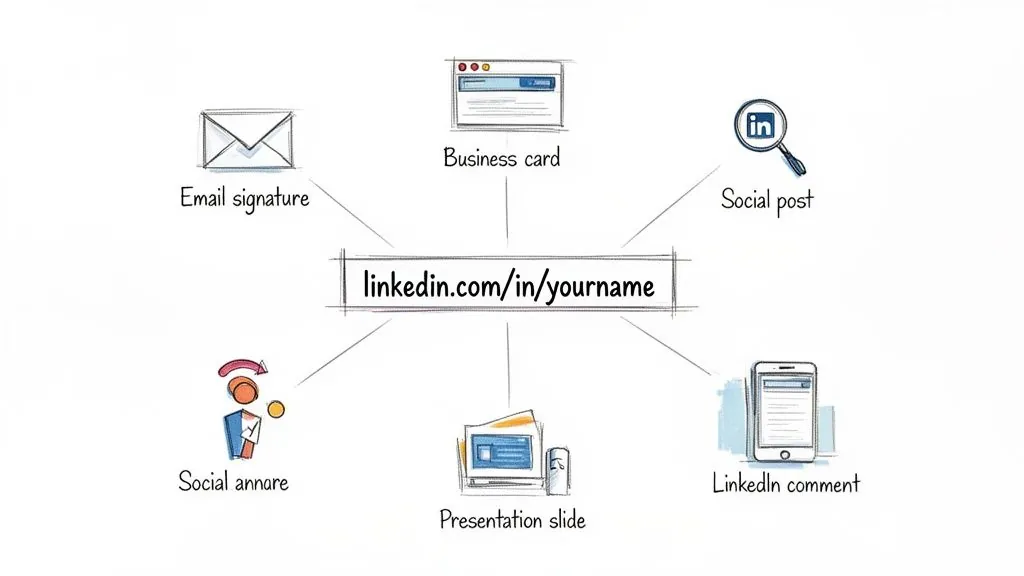
Think of your new URL as the front door to your professional brand. To get people to knock, you need to show them where it is. That means weaving it into every professional touchpoint you have. Consistency here is everything.
Make Your URL Your Professional Hub
Your LinkedIn profile should be the command center for your entire professional presence online. Your custom URL is what connects everything back to that center.
Here’s where you should add your link right away:
- Email Signature: Pop your LinkedIn URL right under your name. It’s a simple, passive way to invite every single person you email to check out your profile.
- Other Social Media Bios: Whether you're on X (formerly Twitter), Instagram, or your personal site, make sure your bio points people back to your LinkedIn.
- Resumes and CVs: This is a no brainer. A clean, custom URL looks infinitely more polished to recruiters than the default jumble of letters and numbers.
- Business Cards and Presentation Decks: When you meet someone in person, a short, memorable URL makes it dead simple for them to find you later.
By cross promoting your profile, you create a powerful network effect that reinforces your brand and makes it effortless for anyone to find you.
Turn Your URL into a Magnet with Active Engagement
Having your link in all the right places is a great start. The real magic happens when you combine that visibility with active, valuable engagement on LinkedIn itself.
Shortening your URL from a 100+ character mess to something crisp like linkedin.com/in/powerin-founder isn't just about looking good; it's smart strategy. As LinkedIn ballooned from 500 million members around 2018 to a projected 1.3 billion by 2026, a custom handle became a necessity for standing out. Considering the platform powers up to 85% of B2B leads and outperforms other socials by a whopping 277%, your URL is a small but critical piece of the lead generation puzzle.
A clean, professional URL is a subtle trust signal. When you show up in comments, groups, or shares, that tidy link encourages people to click and learn more about who you are.
A great URL won't do much if your profile is a ghost town. The goal is to combine a professional link with high value activity. This creates a powerful feedback loop where your engagement drives traffic, and your polished profile converts that traffic into connections.
For example, when you use a tool like PowerIn to automate thoughtful comments, that sleek URL is displayed with every single interaction. It constantly reinforces your brand and pulls prospects back to your profile. That's a direct return on the two minutes you spent customizing your link. To see exactly how this works, check out our guide on how commenting on LinkedIn boosts visibility.
Get the Engagement Flywheel Spinning
With your custom URL ready to go, the real work of building a valuable presence begins. You need to create content that makes your profile a destination people actually want to visit. To get started, it’s worth learning how to write LinkedIn posts that get real engagement and turn your profile into a go to resource.
Think of it as a flywheel that you're setting in motion:
- Engage: First, you share insights and join relevant conversations.
- Attract: People see your professional name and clean URL, and their interest is piqued.
- Click: Thanks to your memorable link, they easily click through to your profile.
- Connect: Your well crafted profile, full of expertise, convinces them you're worth following or connecting with.
This cycle transforms your URL from a static address into a dynamic engine for networking. Every comment and post puts your custom link in front of a targeted audience, driving consistent traffic back to your professional home base. That's the real payoff for taking the time to not only get your LinkedIn URL, but use it wisely.
Common Mistakes and Troubleshooting Your URL
Nailing your custom URL is a quick win, but a few common slip ups can cause some real headaches later on. Think of this as your field guide to avoiding the pitfalls that I've seen trip up even the most experienced professionals.
One of the most tempting mistakes is changing your URL too often. LinkedIn lets you change it up to 5 times every 180 days, but that doesn't mean you should. It's a bad habit to get into. Each time you hit "save" on a new URL, the old one instantly breaks, sending anyone who clicks it to a frustrating "Profile not found" page.
LinkedIn doesn't set up redirects for old profile links. It’s not like forwarding your mail. So, my advice is to treat your URL like a permanent part of your brand. Only change it if you have a massive reason, like a legal name change or a complete career reinvention.
Solving Common URL Headaches
Even when you do everything right, you can still hit a wall. What happens when the clean, simple URL you want is already taken? This is easily the most common hurdle, but don't resort to tacking on a long string of random numbers. That just looks sloppy.
Before you do that, try these professional looking variations first:
- Add a middle initial (
/in/johnrsmith) - Use a hyphen to separate your first and last name (
/in/john-smith) - Add a relevant keyword (
/in/johnsmith-sales)
Another issue I see pop up is choosing a URL that’s a little too clever or cute. Sure, /in/marketingmaverick might sound creative in your head, but it’s not easy for people to remember or search for, and it can come across as unprofessional. Always lean toward clarity and simplicity. Your name is your brand, stick to it.
Finally, a critical point people often forget is to update the new link everywhere it lives online. As soon as you’ve successfully claimed your new URL, you need to go on a mission to swap out the old one.
Key Takeaway: Your old URL will not automatically redirect to your new one. It becomes a dead link. Failing to update it across your digital footprint is like handing out business cards with the wrong phone number.
What to Do if Your Desired URL is Taken
Let's get practical. You've tried your name, your name with a middle initial, and it’s all gone. Before you throw in the towel, there are a couple of other strategies you can use to land a URL that’s both professional and available.
Strategy 1: Add a Professional Title or Credential
This is a great option because it immediately adds context and can even help people discover your profile.
/in/sarahjones-cpa/in/davidchen-pmp/in/michaelrivera-mba
Strategy 2: Add a Geographic Identifier
This works especially well if your business is local or your work is tied to a specific region.
/in/emilycarter-nyc/in/liwang-sfbay
Remember, your URL is a piece of your personal marketing. Make it easy for people to find you. Part of this is also understanding the different kinds of LinkedIn links you might be sharing. For instance, if you’re a heavy user of premium tools like Sales Navigator, it’s worth learning how to convert Sales Navigator URLs to standard LinkedIn URLs to make sure you're always sharing the public facing link that everyone can access.
Your Post Change Checklist
To make sure the transition is seamless, run through this quick checklist right after you update your URL. This guarantees you’ve covered all your bases and won't leave a trail of broken links for others to find.
- Email Signature: Is the new link in all your email accounts?
- Other Social Profiles: Did you update your bio on X (Twitter), Instagram, or anywhere else?
- Personal Website/Blog: Is the link on your "About Me" or contact page correct?
- Resume/CV: Have you updated both the digital and print versions of your resume?
- Business Cards: Don't forget to get this updated for your next print run.
- Presentation Templates: Check any standard slide decks you use.
Taking just five minutes to run this audit will save you from missed connections and confusion. It’s a small step that ensures your polished brand shows up consistently and correctly everywhere.
Common Questions About Your LinkedIn URL
Once you've decided to customize your LinkedIn URL, a few questions almost always pop up. I've walked hundreds of professionals through this process, and the same concerns surface time and again.
Let's clear up the confusion so you can manage your URL with confidence.
What Happens to My Old LinkedIn URL After I Change It?
This is the big one, and the answer is crucial. As soon as you save your new custom URL, the old one dies. It's gone. Instantly.
There's no redirect. Anyone clicking a link to your old, clunky URL will hit a "Profile not found" page. That’s why your first task after making the change is to go on a scavenger hunt. Update your URL in your email signature, on your personal website, in your Twitter bio: anywhere you’ve ever shared it. Think of it like moving houses and needing to update your address with everyone, not just the post office.
How Many Times Can I Change My LinkedIn URL?
LinkedIn is pretty generous here. You can change your custom URL up to 5 times within a 180 day period. But honestly, just because you can, doesn't mean you should.
Your URL is a cornerstone of your digital brand. Changing it frequently creates a trail of broken links and confusion for people trying to find you. My advice? Pick a professional, lasting URL and stick with it. The only time you should really consider a change is for a major life event, like a name change or a complete business rebrand.
Treat your LinkedIn URL like a digital tattoo, not a temporary sticker. A stable, consistent link builds trust and ensures you’re always findable. Frequent changes erode that trust and create dead ends for your network.
Will Changing My LinkedIn URL Affect My Profile's SEO?
Yes, but it's a classic case of short term pain for long term gain.
When you first change your URL, you might see a temporary dip in your search visibility. That’s just Google and other search engines needing a moment to find your new address and reindex it. But a clean, keyword optimized URL is so much better for SEO in the long run. A URL like /in/yourname-your-specialty tells search engines exactly what your profile is about, which can improve your ranking over time.
Plus, a custom URL looks more professional and trustworthy, which encourages more people to click. That increased traffic is another positive signal to search engines that your profile is a valuable result.
Can I Use Keywords in My URL to Attract Prospects?
You absolutely can, and it's a savvy move. Adding a keyword or two that describes what you do is a simple way to boost your visibility for relevant searches.
For example, instead of a plain /in/johnsmith, something like /in/johnsmith-b2b-sales immediately signals your expertise. It frames your professional identity before anyone even lands on your profile.
If you go this route, just remember a few things:
- Keep it professional. Avoid anything that sounds like marketing hype, like
/in/best-sales-guru-ever. - Be concise. A simple
YourName-YourProfessionorYourName-YourIndustryworks best. - Find the balance. You're aiming for a blend of personal branding and discoverability.
This tiny tweak can make a surprisingly big difference in getting your profile in front of the right people.
Ready to put your newly polished URL to work? With PowerIn, you can turn that professional link into a lead generating machine. Our AI powered tool posts high quality, relevant comments on LinkedIn and X, driving a steady stream of targeted prospects back to your profile. Start engaging consistently, building your brand, and converting attention into opportunities. Try PowerIn with a 5 day free trial and get 500 free prospects.