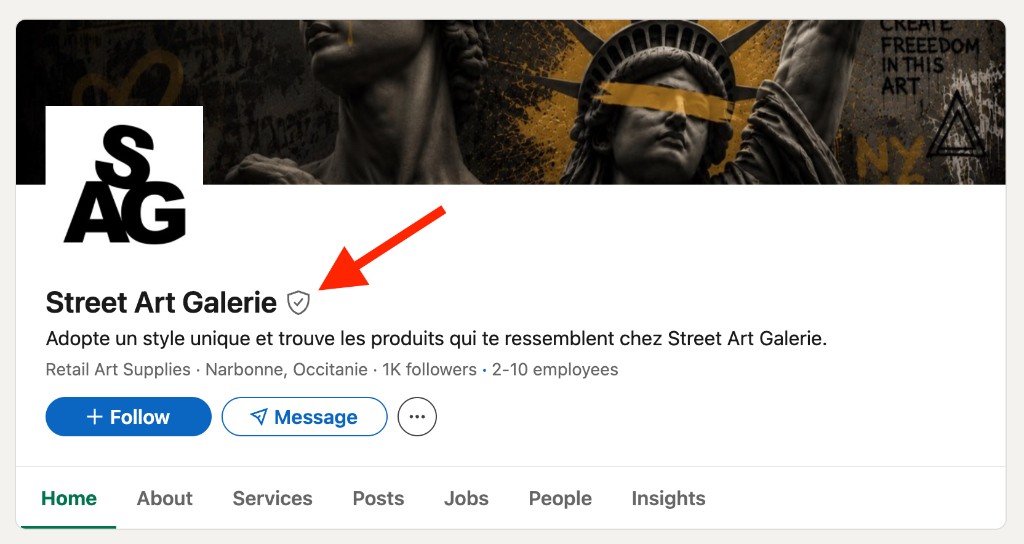
Badge on the company page
The verification mark next to the organization name signals that LinkedIn confirmed the page is the official page — not a lookalike or listing stub.
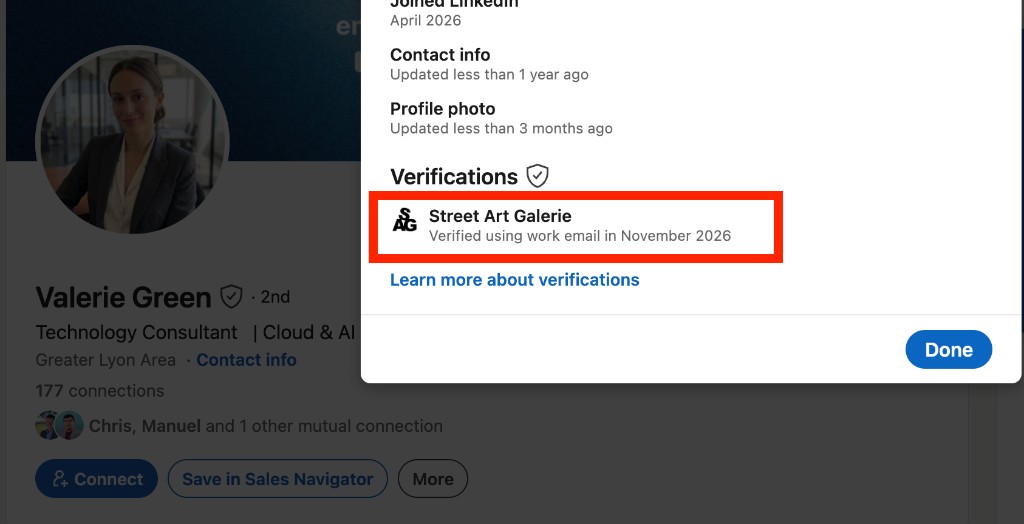
Two linked outcomes: the company page gets LinkedIn’s verification badge, then employees can verify they work there with their work email and a code — the trust signal shows on their personal profile.
Buyers, candidates and partners check whether the organization looks real before they reply, apply or take a meeting.
The verification mark next to the organization name signals that LinkedIn confirmed the page is the official page — not a lookalike or listing stub.
After the page is verified, admins enable workplace verification. Staff enter their work email, receive a code, confirm it, and the verification appears on their profile.
Verified company pages feed into LinkedIn’s job-post trust signals when the poster is also workplace-verified. Recruiters and sales teams look less like cold spam.
A verified page is the anchor brand people should trust. Admins of verified pages get stronger tools to challenge fake “employees” claiming the company name.
Premium Company Page alone starts near $100/month and only makes you eligible. We handle setup, eligibility path and the verification push so you land on the badge, not a pending screen.
Need a clean company entity for client delivery, lead gen or a new brand? We deliver the page ready, with you as owner — then your team can verify under that domain.
From order to badge — without you fighting LinkedIn admin screens alone.
Name, email, and either your live website — or add the +$250 option and we create domain + site for you.
Page setup, eligibility path and verification request aligned to LinkedIn’s criteria (claimed page, accurate data, active admin).
Once verified, enable workplace verification. Staff enter work email, get a code, confirm — badge-level trust on their profiles.
| Capability | Verified with PowerIn | Standard free page |
|---|---|---|
| Verification badge on the page | Yes | No |
| Employees verify with email + code | Yes, once workplace verification is enabled | Not available |
| Trust for candidates and buyers | Clear official-org signal | Looks unverified |
| Setup effort | Done for you · $1,200 | DIY + months of eligibility guesswork |
| Ownership | You are super admin | You are super admin |
People looking for a LinkedIn verified company page, company page verification or workplace verification usually want one outcome: the badge, plus the ability to verify staff.
LinkedIn grants page verification when a claimed company page meets its criteria and completes review. Eligibility often involves a commercial relationship with LinkedIn (for example Premium Company Page, Ads or Jobs). Verification itself is not a public “buy badge” button — which is why operators hire a done-for-you service to open the page correctly, pass eligibility and request verification without weeks of trial and error.
Once the page shows the badge, the second unlock matters as much as the first: workplace verification. Super admins approve email domains. Employees enter that work email, receive a code, confirm it, and LinkedIn displays the workplace verification on their profile. That is the loop sales and recruiting teams actually want — not a logo for its own sake.
Mismatched page names, websites and email domains are the most common DIY failure. If you do not have a site yet, add the +$250 website + domain package so verification and workplace email share one coherent brand story.
Need followers on the new page after it is live? Pair this with company page followers. Building personal brands under the company? Start from ID verified LinkedIn accounts. Recovering a restricted personal profile instead? See LinkedIn account recovery.
A verified LinkedIn Page shows a verification badge next to the organization name. LinkedIn confirms the page represents the official company. Once verified, admins can enable workplace verification so employees prove they work there with a work email and a one-time code.
After the company page is verified, staff can verify their workplace on their personal profiles. They enter the company email, receive a code, confirm it, and the verification appears on their profile. That trust signal helps hiring, sales outreach and job posts that show verified company + verified poster.
Most orders complete in 2 to 5 business days once we have the company name, website and contact email. LinkedIn’s own review can take up to several days after eligibility is in place.
Company legal or trading name, website URL that matches the brand, and an email we can reach you on. No website yet? Add the +$250 domain + site option. We handle page setup, eligibility and the verification request. You stay owner of the page.
LinkedIn Premium Company Page starts around $99.99 per month and makes a page eligible for verification, but eligibility is not the badge. Our $1,200 done-for-you service opens the page, prepares it for verification and pushes through to the badge so your team can use workplace verification.
Workplace verification lets employees confirm they work at a company by entering a work email on an approved domain and confirming a one-time code. It only becomes available after the company page itself is verified. The verification then shows on the employee’s LinkedIn profile.
Yes. You receive super admin access. Add your team, approve email domains for workplace verification, and manage the page as the owner. If you ordered the website add-on, the domain is registered under your ownership too.
Yes. Add the +$250 option at checkout. We register a matching domain and build a clean company site so LinkedIn verification and workplace email line up with a coherent brand story.
Yes. Open Telegram with the button on this page (@powerinmarketplace) and share the company website. We will confirm fit before you order.
$1,200 done for you. Badge on the page. Employees verify with email + code.