Managing LinkedIn with a team sounds simple. In practice, it can quickly turn risky. A few careless logins from different locations can trigger security checks or even lock your account.
If you've been searching for how to share LinkedIn accounts safely, you're in the right place. This guide provides practical options, what to avoid, and how to set up a workflow your team can rely on.
👉 If you want a safer setup from day one, you can explore AdsPower solutions and try its team collaboration features to share LinkedIn access without exposing passwords.
Why Teams Share LinkedIn Accounts
For many teams, LinkedIn management (business page or personal page) is part of the daily job, not just a place to post updates. It's used for outreach, hiring, client management, and brand building.
Here are some common scenarios:
- Sales teams running outreach campaigns and managing conversations
- Recruiters communicating with candidates and tracking responses
- Agencies handling multiple client profiles
- Founders delegating content, messaging, and engagement
In all of these cases, accessing and managing a shared LinkedIn account becomes necessary. The catch? LinkedIn is designed for individual use, not team access; so sharing needs to be done thoughtfully to avoid issues down the line.
What Can Go Wrong When Sharing LinkedIn Accounts
Before choosing a method, it helps to know what causes trouble.
1. Account Restrictions
LinkedIn tracks login behavior. If your account shows:
- Logins from different countries within hours
- Device or browser changes
- Unusual activity spikes
You may face verification checks or temporary locks.
According to LinkedIn Help Center, unusual login activity is one of the main triggers for account restrictions.
2. Security Risks
Sharing passwords in plain text creates problems:
- Anyone with access can log in anytime
- Credentials may get reused or leaked
- Sensitive messages and contacts are exposed
For business accounts, this can quickly become a serious issue.
3. No Visibility Across Team Actions
When multiple people use the same login:
- You cannot track who sent messages
- Mistakes are harder to fix
- Strategy becomes inconsistent
4. Slower Workflows
Manual sharing often leads to:
- Logging in and out repeatedly
- Waiting for access
- Miscommunication between team members
Principles for Safe LinkedIn Account Sharing
If you remember only a few things, make it these:
- Keep login environments consistent
- Avoid switching locations frequently
- Control who can access the account
- Track activity whenever possible
- Do not share passwords unless necessary
These basics help you maintain stable LinkedIn account management.
5 Ways to Share LinkedIn Accounts with Your Team
Not all methods offer the same level of safety. Here's how they compare.
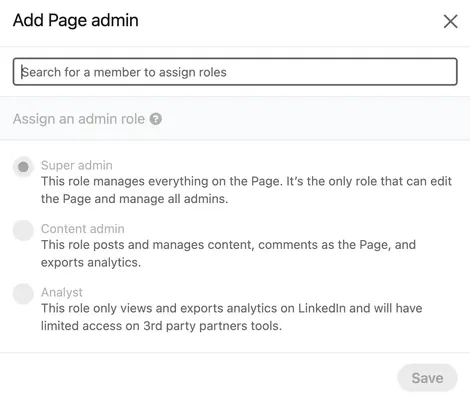
1. LinkedIn Page Roles
If you manage a company page, you can assign roles such as admin or content creator.
This is the safest option for brand pages.
It does not work for personal accounts.
2. Password Managers
Password managers let you share login details securely.
They are easy to set up.
However, they do not solve location or device mismatch issues.
You still risk triggering LinkedIn's detection system.
3. Remote Access to One Device
Some teams log in through a shared computer using remote tools.
This keeps the environment consistent.
It works for small teams, but it becomes slow and hard to scale.
4. Virtual Browser Setups
Virtual environments simulate a consistent browser.
They offer more control than manual methods.
Setup and maintenance take time.
5. Antidetect Browsers (Practical for Teams)
This method is widely used by teams handling multiple accounts. It allows users to share LinkedIn accounts via profile sharing or team management.
It works by creating separate browser profiles. Each profile keeps:
- Its own cookies
- Its own device fingerprint
- Its own IP setup
This helps maintain a stable login environment, which reduces risk.
How AdsPower Helps You Share LinkedIn Accounts Safely
If your team needs a reliable workflow, AdsPower browser provides a structured way to manage access without being banned.
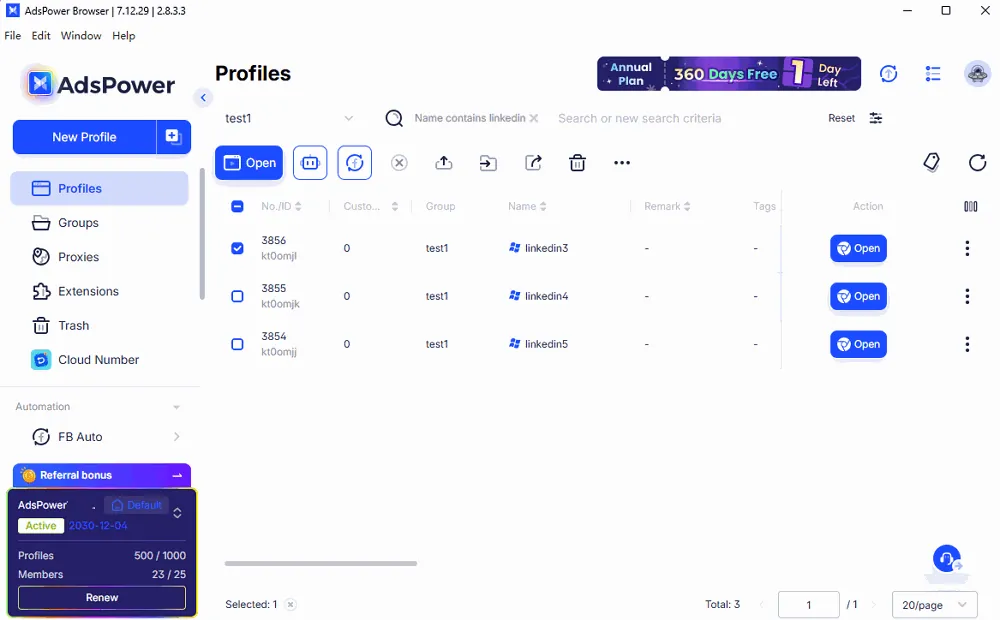
Share Profiles Without Sending Passwords
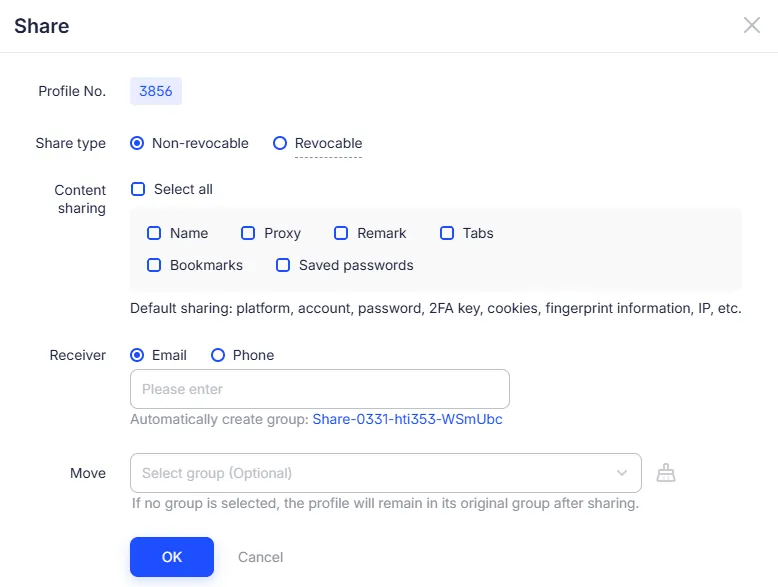
Instead of giving out credentials, you share a browser profile.
If you tend to share the accounts to others who is not in your team, just select the linkedin profile and hit the Share button to set up the Receiver. Then the receiver will get the notification and access that profile. Moreover, the login session and fingerprint is the same so it would reduce the platform's suspicion of the account.
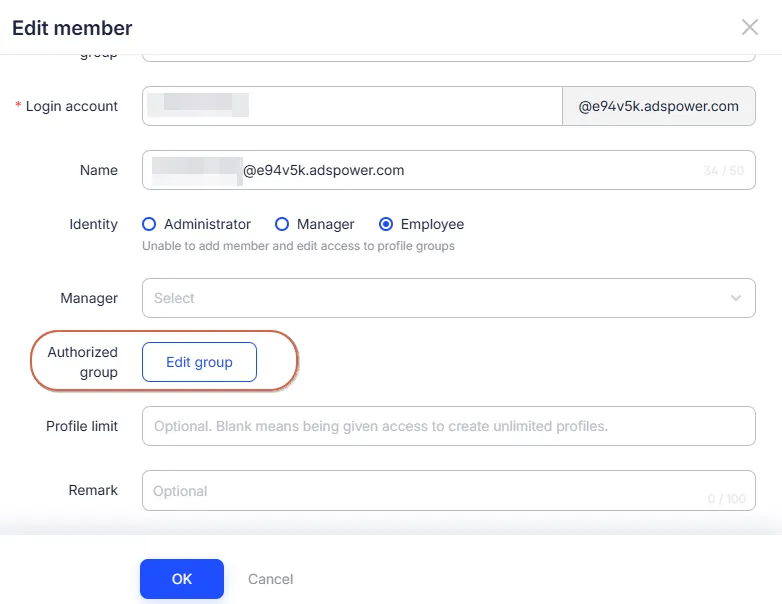
Set Permissions for Each Team Member
On the other hand, AdsPower also allows you to share the account to your team members via assigning the permissions of the profile. Then they can:
- View profiles
- Log into the LinkedIn account
- Fully manage the account
This keeps your workflow organized.
Grow Faster with PowerIn
Once your accounts are shared safely, the next step is growth.
This is where PowerIn fits into your workflow.
What PowerIn Does
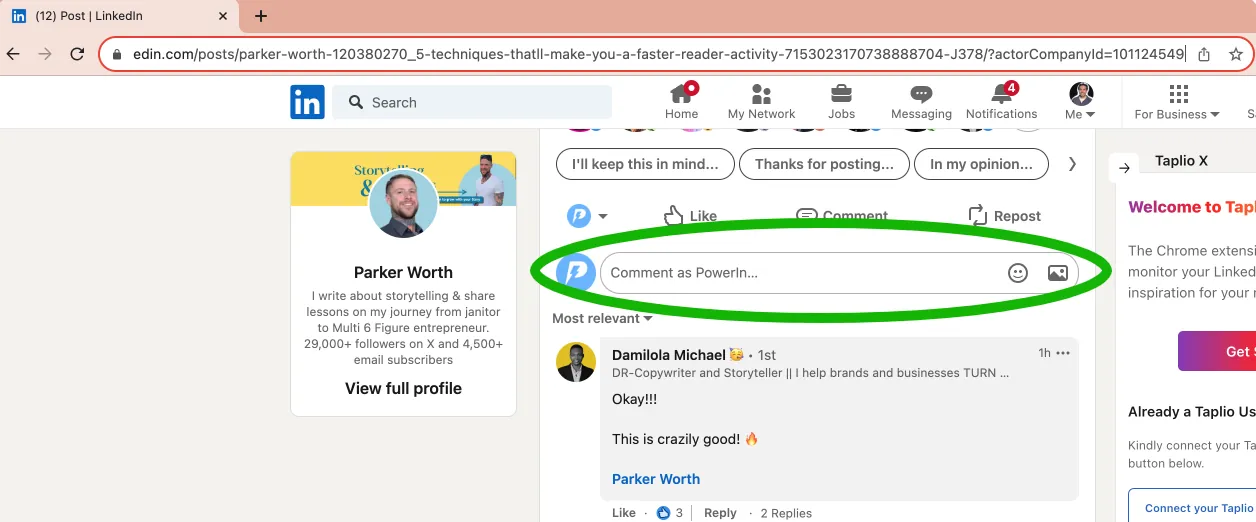
PowerIn helps automate LinkedIn comments based on:
- Specific creators
- Target keywords
This keeps your account active and visible.
Why Comments Matter
Consistent commenting can:
- Increase profile visibility
- Attract connection requests
- Build credibility in your niche
You can learn more about LinkedIn engagement strategies from HubSpot, which highlights how consistent interaction improves reach.
Using AdsPower with PowerIn
- AdsPower keeps your accounts stable and secure
- PowerIn handles engagement at scale
This setup supports both safety and growth without adding manual work.
👉 If you want to test this workflow, visit PowerIn's official page and try automating your first campaign.
FAQs
How do I share my LinkedIn account safely?
Use tools that allow environment sharing instead of sending passwords.
Can LinkedIn detect multiple users?
Yes. The platfrom tracks IP, device, and behavior patterns.
Can I manage another person's LinkedIn account?
Yes, if you use controlled access and stable login environments.
What is the safest method?
Using AdsPower's browser profile sharing with proper access control.
Sharing one login between several people always carries some risk. Often it's simpler to give each teammate their own profile: you can buy verified LinkedIn accounts for your team, each one set up and ready to use.
Final Thoughts
Sharing LinkedIn accounts is part of modern teamwork. The method you choose makes a big difference.
If you rely on manual sharing, risks increase over time. A structured setup helps you stay consistent and avoid interruptions.
👉 You can explore AdsPower to manage account access securely, and pair it with PowerIn to grow your reach through automated engagement.